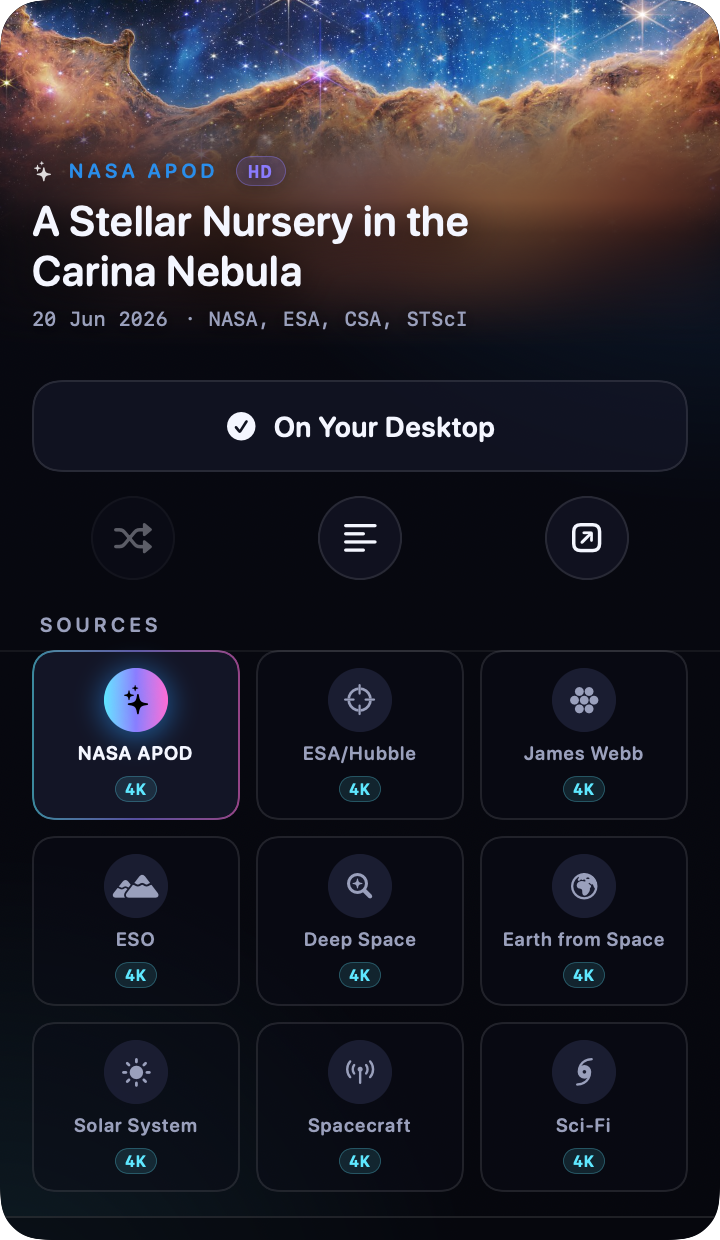
A menu-bar instrument, carved from obsidian glass.
Click the star in your menu bar and a panel of frosted black glass floats over your desktop. Today's image fills the hero; the interface quietly re-tints to wear its colours. One tap sets it as your wallpaper.
Features
Simple on the surface. Deep underneath.
Always the latest APOD
Every day, Caelum fetches NASA's Astronomy Picture of the Day and sets it as your wallpaper - automatically, in the background.
10 reliable sources
APOD is the star - joined by ESA/Hubble, James Webb, ESO, NASA EPIC and themed 4K collections: Earth from Space, Solar System, Space Stations and Interstellar (black holes & wormholes).
Instant & analysed
Caelum prefetches the newest images in the background, so switching is instant - and reads each image's true pixel size to badge it 4K, HD or SD.
Lives in your menu bar
Open Caelum from the menu bar on macOS or the system tray on Windows and Linux. Linux window behaviour depends on the desktop environment.
The UI wears the cosmos
Caelum extracts the dominant colour of each image and tints its accents to match - every image gives the app a new mood.
Private & open source
No accounts, no tracking, no analytics. Images come straight from public APIs. The whole thing is MIT-licensed on GitHub.
Ten Libraries
APOD is the star. It's in good company.
Switch sources from the strip inside the panel. Everything works out of the box - no API keys required.
Install
On your desktop in a minute.
1
Download & unzip
Grab the latest Caelum.zip from GitHub Releases and unzip it into /Applications.
2
Right-click → Open
Caelum is free and open source, so it isn't notarized. On first launch, right-click the app and choose Open to get past Gatekeeper.
3
Find the star
Look for the orbit glyph in your menu bar. Click it, pick a source, and you're flying.
Tip: No API keys needed. Caelum announces new versions in its panel and can install them for you - turn on automatic installs in Settings.